 TidyMetrics
TidyMetrics docs
Overview
TidyMetrics is small, privacy-friendly analytics for SaaS. It counts visitors like any web analytics tool, then follows every Polar.sh payment back to the channel, campaign, page or in-app prompt that earned it.
Every number you can filter by — country, source, device, page, goal — comes with revenue next to it. So instead of "we got 4,000 visitors" you get "Hacker News brought 300 visitors and $2,400."

Getting started
TidyMetrics is open source and self-hosted. You run your own copy and sign in as the owner.
- Clone the repository from GitHub and deploy it to your own hosting.
- Connect a Postgres database with auth and run the included migrations.
- Turn on Google sign-in in your auth service and sign in. There's no sign-up page — it's just you.
- Open Setup, add your domain, and copy the snippet.
- Paste the snippet into your site, then connect Polar.sh.
Install the snippet
Add one script tag to the <head> of every page:
<script defer data-website-id="YOUR_WEBSITE_ID"
  src="https://your-tidymetrics.com/api/public/script.js"></script>
Pageviews, referrers, UTM tags and single-page app navigation are tracked automatically.
Site + app subdomains
Use one website for your marketing site and your app (for example wayflo.com and app.wayflo.com). Put the same snippet with the same ID on both. The visitor ID is shared across your root domain, so a visitor who arrives from Twitter, signs up, and later upgrades from a NudgeKit prompt is one journey — not two strangers.
Connect Polar.sh
- In Polar, go to Settings → Webhooks → Add endpoint.
- Paste the webhook URL from the Setup page, pick format Raw, and subscribe to
order.createdandsubscription.created. - Save Polar's signing secret as the
POLAR_WEBHOOK_SECRETserver secret. Unsigned requests are rejected.
For the most accurate attribution, pass the tracker's metadata into your checkout:
const meta = window.datafast.getMetadata();
// → { visitor_id, session_id, nudgekit_campaign_id }

await polar.checkouts.create({
  products: [productId],
  metadata: meta,
});
Identify users
Call this after sign-in or sign-up. If a payment arrives without metadata, TidyMetrics matches the buyer's email to the visitor.
window.datafast.identify(user.id, { email: user.email });Dashboard
The top row shows unique visitors, pageviews, paying customers, revenue and revenue per visitor, each compared with the previous period. The chart shows visitors and revenue per day.
Below that are breakdown cards: sources and channels, pages, NudgeKit prompts, locations and technology, and goals. Every row shows revenue.
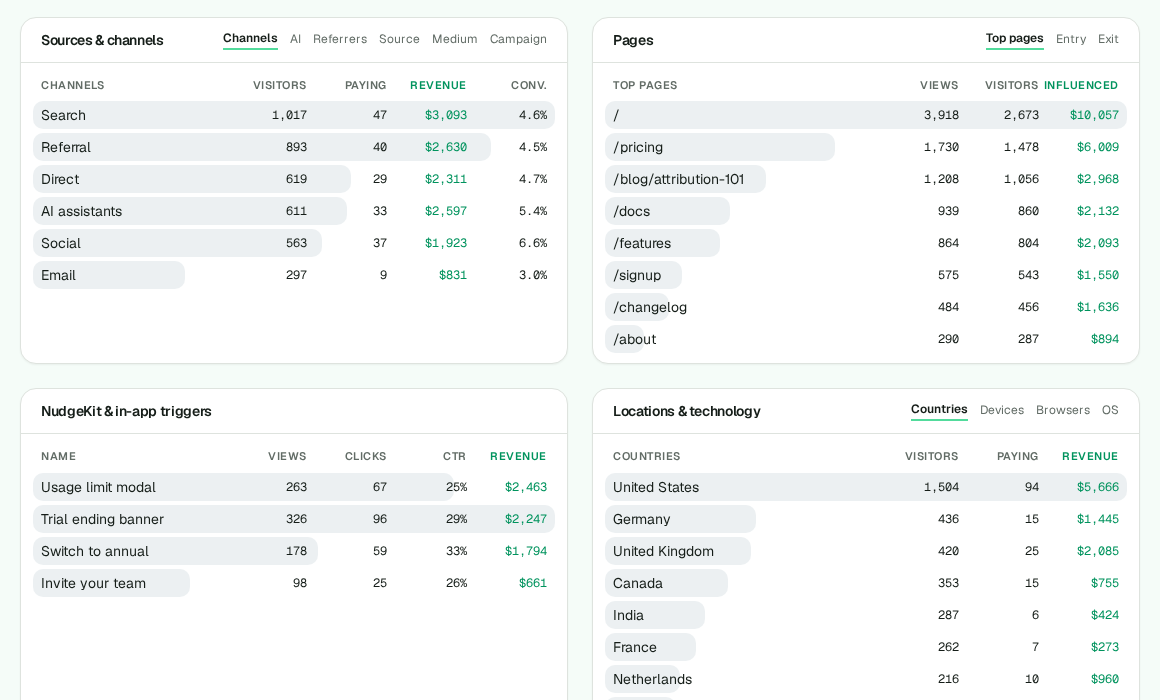
Channels & AI referrals
Each visit is grouped into a channel: AI assistants, Search, Social, Email, Paid, Referral or Direct. The AI tab lists ChatGPT, Perplexity, Claude and friends individually. Switch to Referrers, Source, Medium or Campaign for the raw values.
Filters
Click any row — a country, a channel, a page, a goal — and the whole dashboard filters to it. Remove the filter with the × on the chip above the numbers.

Goals & custom events
Track conversions that aren't payments, like a sign-up or a demo request. No code needed — add an attribute to a form or button:
<form data-track-goal="signup" data-track-prop-plan="free">
  ...
</form>
Or from JavaScript:
window.datafast.track("signup", { plan: "free" });Goals appear in the Goals & custom events card with uniques, totals and conversion rate. Click one to see where those converters came from.
NudgeKit prompts
If NudgeKit is on your app, TidyMetrics picks up its events automatically. The NudgeKit card shows views, clicks, click rate and the revenue from people who clicked a prompt before paying. The In-app nudges tab has the full list.
Setup page
Add websites, copy the snippet (plain HTML or Next.js), and find your Polar webhook URL.

FAQs
How is revenue attributed?
Each payment gets the visitor's first-touch source (the referrer or UTM campaign that first brought them in) and, if they clicked a NudgeKit prompt before buying, that prompt as the last touch.
Does TidyMetrics use cookies?
Only one first-party visitor ID, scoped to your own domain so your site and app can share it. No ad networks, no cross-site tracking, no data brokers.
Why does a payment show up as Direct?
The buyer couldn't be matched to a visit. Pass window.datafast.getMetadata() into your Polar checkout metadata, or call identify() with their email after sign-in.
Which AI assistants are recognized?
ChatGPT, Perplexity, Claude, Gemini, Copilot, You.com, Phind, DeepSeek, Meta AI, Grok and Mistral — by referrer host or utm_source.
Will the script slow down my site?
No. It's about 3KB, loads with defer, and batches events with sendBeacon.
Are bots counted?
No. Common crawlers and headless browsers are filtered out on arrival.
Is there a hosted version?
No. TidyMetrics is open source — grab it from GitHub and run your own copy.